Paper, folds, and what’s new in fanzines.app
A few months ago, I wrote about how I started giving away zines to my friends, my family, and people at work.


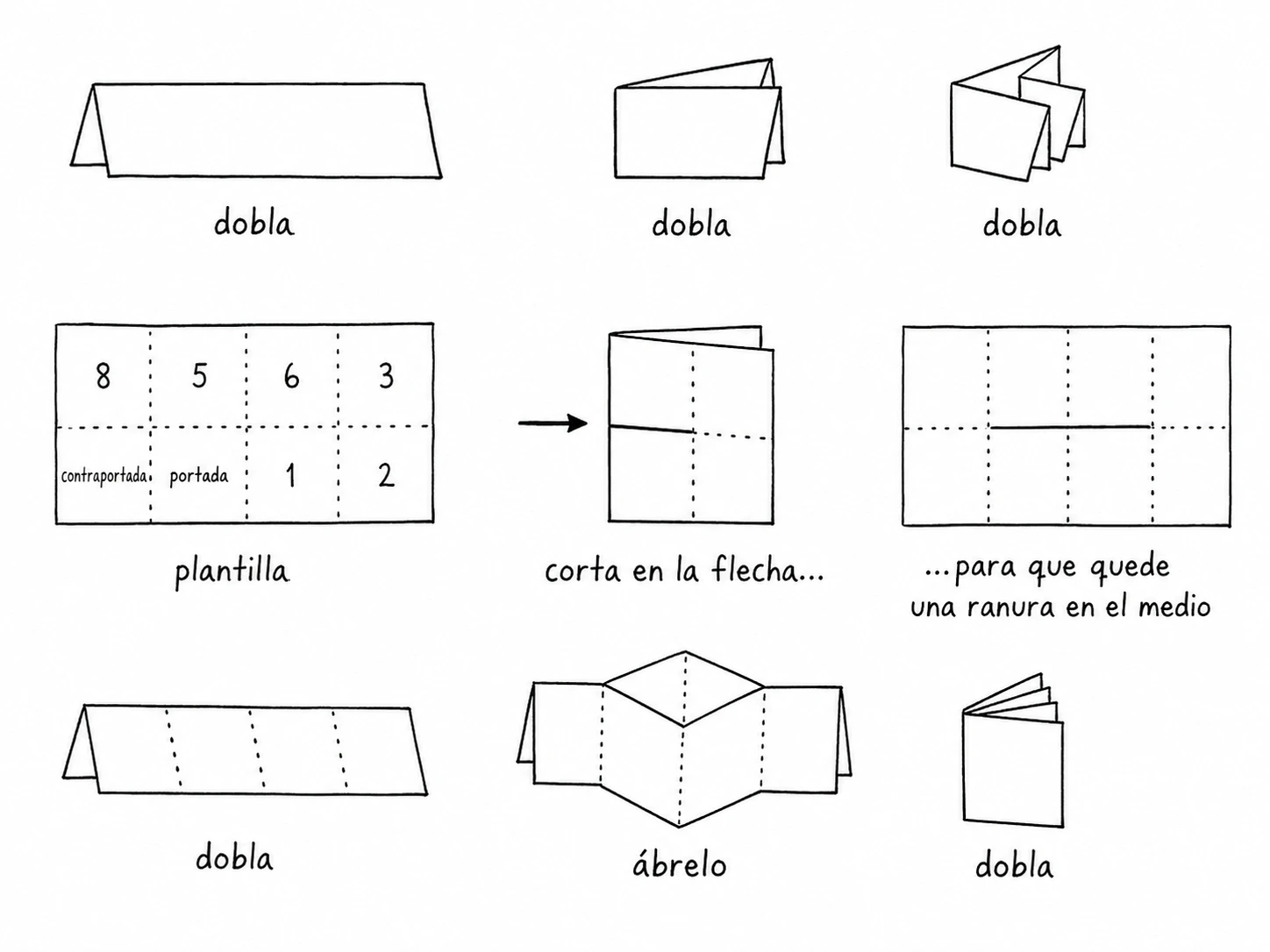
If you've never made one, the fold is simple. Take a single A4 sheet of paper, fold it in half three times, open it back up, and cut along the center crease with scissors. Fold the sheet into a cross and close it, and you have an 8-page booklet with no staples or glue.
I fill mine with whatever I feel like printing: photos, poems, or notes.
Why fanzines.app exists
The part I never liked was laying out the flat sheet on the computer before printing. Because the A4 paper folds back on itself, the pages sit in a strange order and the top row has to be upside down:
┌─────────┬─────────┬─────────┬─────────┐
│    6    │    5    │    4    │    3    │   ← upside down (180°)
├─────────┼─────────┼─────────┼─────────┤
│  Back   │  Cover  │    1    │    2    │   ← right-side up
└─────────┴─────────┴─────────┴─────────┘
I got tired of rotating pictures and double-checking columns in Photoshop every time I wanted to print a new zine, so I built fanzines.app.
In the browser, you lay out each page right-side up with photos and text. When you export, the app places all 8 panels onto the A4 grid with the top row rotated 180 degrees and generates a 300 DPI PDF. Everything stays local in the browser; no photos are uploaded to a server.
Over the last few days, I rebuilt the editor around the things that kept getting in my way when I sat down to make a zine.
Fixing how pages are paired
In the first version, the sidebar listed the 8 pages in a plain two-column grid. It paired the Front Cover with Page 1, Page 2 with Page 3, Page 4 with Page 5, and Page 6 with the Back Cover.
It looked tidy on screen, but it didn't match the physical booklet. When you hold a folded zine, the front cover sits alone on the right. Open it and Page 1 faces Page 2 across the fold, then 3 faces 4, 5 faces 6, and the back cover ends up alone on the left.
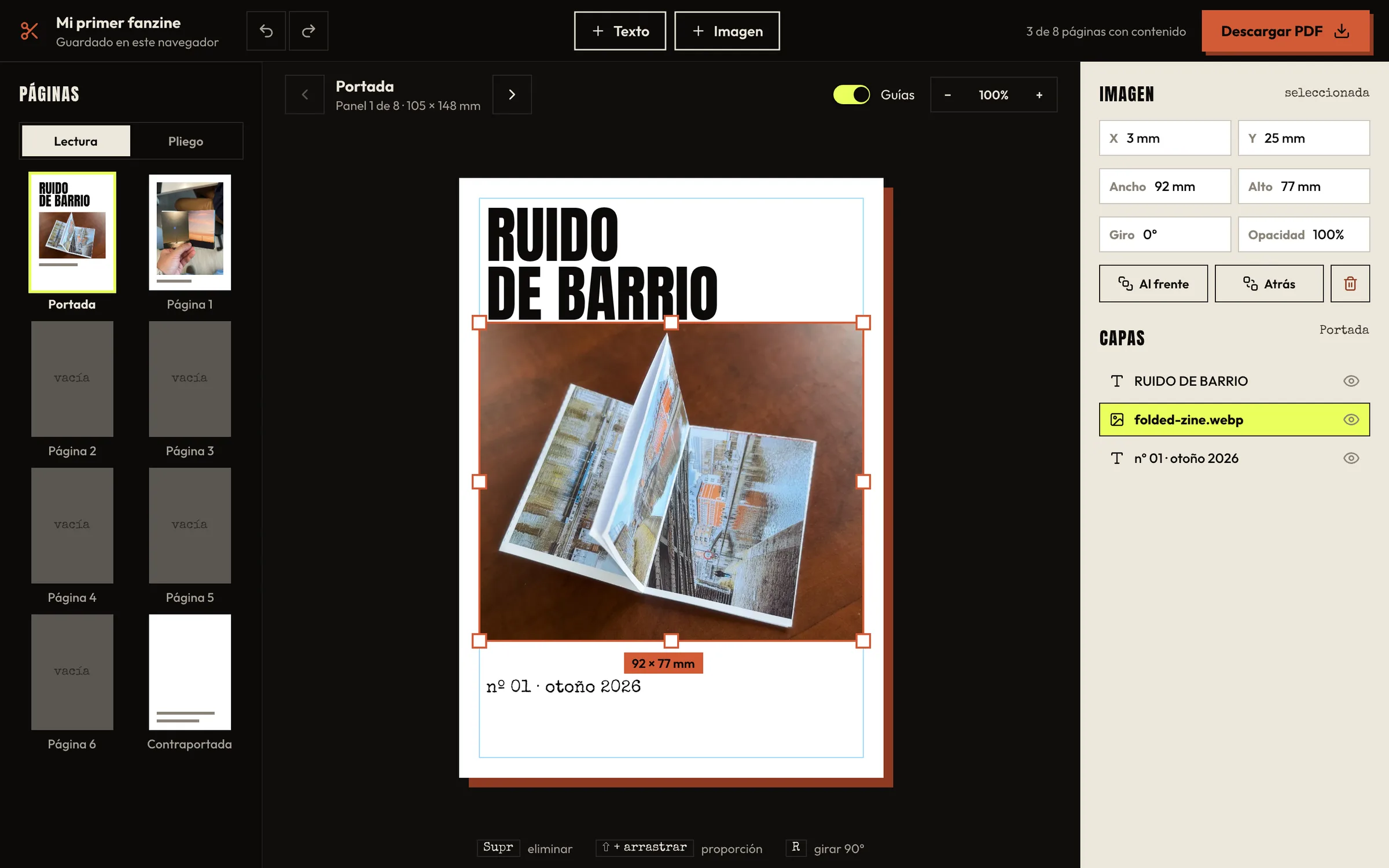
The sidebar now groups the page thumbnails into those real spreads, in reading order.
I also added a Spread view on the canvas. While you're editing Page 1, Page 2 sits beside it at lower opacity so you can check how the two facing pages sit together before printing. Clicking the dimmed page switches straight to editing it.
Smaller changes that make the editor less fussy
When I make a photo zine, I usually start with a folder of 8 photos already picked out. Now you can drag the whole batch onto the editor window, and the sidebar highlights which pages will take each photo in reading order before you drop them.
I changed the side panel too. Early on, clicking a photo opened four coordinate inputs (X, Y, Width, Height). I rarely needed to type coordinates; mostly I wanted a photo to fill the page, fit inside the margins, or sit centered. Fill, Fit, and Center now sit at the top of the inspector and in a small toolbar above the selection.
The exact fields are still in a collapsible section at the bottom, now in millimeters (for the 74.25 × 105 mm folded panel) and points for text.
Before downloading the PDF, a Review step shows the full unfolded A4 sheet with toggles for cut/fold lines and a 5 mm safe margin. Most home printers clip a few millimeters around the edge of an A4 sheet, so the safe margin scales the layout to about 95% to keep the covers intact.
A couple of other additions: the editor now works on phone screens (one page at a time with a thumbnail strip along the bottom), and the site is available in English as well as Spanish. Changing the language keeps your current pages.
Thanks for reading, Wil
You can create your own zine in English or Spanish at fanzines.app